It’s now easier to access your member ID card information wherever you go.
- October 8, 2026
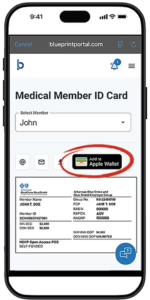
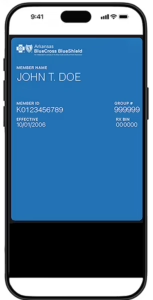
Don’t have your physical member ID card handy? No worries! Sign in to the Blueprint Portal app on your phone and add the information from it to your digital wallet in a virtual format for quick access.
Before your next appointment, make sure you have your member information with you by adding a virtual copy of your ID card to your phone. Providers use it to confirm your coverage and file claims correctly. It also helps prevent check-in delays.
How it works
1 – SIGN IN
In the Blueprint Portal app, select “ID Card”
from the navigation menu.
2 – ADD TO DIGITAL WALLET
Tap on the “add to wallet” button just above
the ID card, then tap “add.”
3 – SHOW & GO
Navigate to your digital wallet when checking
in to your appointment.

Update your contact information
To receive information about your health insurance and benefits, it is important for ACA/ARHome members to update your phone number, mailing address and email address with the Arkansas Department of Human Services (DHS). You should update your information if you:
- Move to a new place or get a new phone number or email
- Find out you’re pregnant
- Need to renew your health insurance
You can update your information by:
- Calling the Arkansas Department of Human Services (DHS) at 888-987-1200
- Going to access.arkansas.gov
- Visiting a local DHS office for help